
For this project you will develop a home security system written in C that collects and prints data from sensors around the home. A given sensor detects and reports one or more of the following types of information:
The system logs all sensor reports on a per room basis; each room has an associated log of all its sensor reports (or events). This log is kept in a fixed size circular buffer, along with an event count of all the events that have been logged for the room since the system was last (re)started, and the indices in the buffer of the oldest and newest log entries for the room.
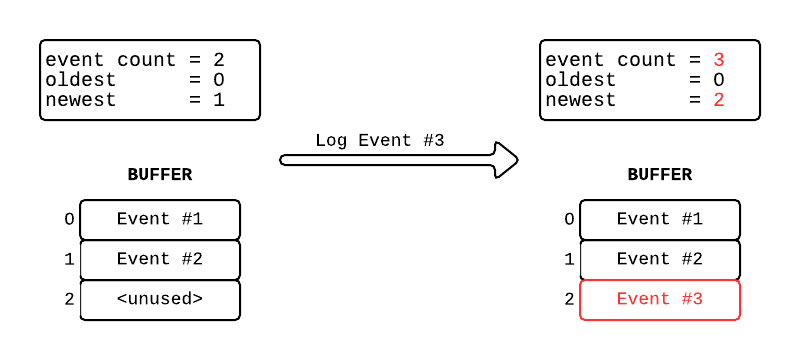
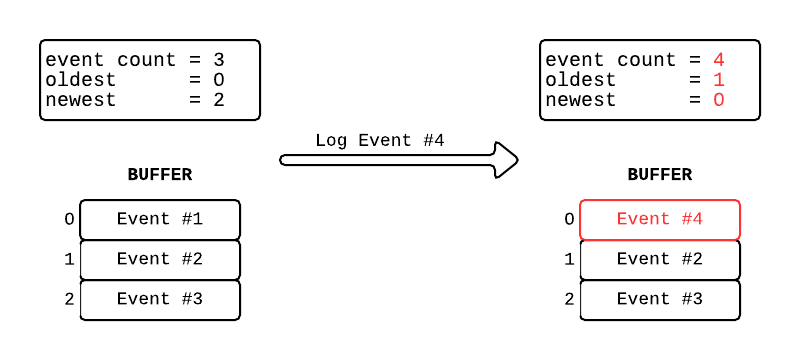
Readings of sensor events are provided to your program via standard
input as lines of comma separated values (CSV):
ROOM,SID,HH:MM:SS,TYPE[,VALUE]
where each of the values is defined as follows:
ROOM is
the room number (0 to 4,inclusive).
SID is the
sensor ID number within the room (≥ 1).
HH:MM:SS is the time of
the event using a 24 hour clock (HH
is hours, MM
is minutes, SS
is seconds).
TYPE is an integer flag
indicating event type:
VALUE is an
integer,and is only found on type 1 and 2 events. For type 1 the value
is the temperature; for type 2 the value is carbon monoxide
concentration in parts per billion (PPB).
The PRINT command prints the room alarm system status and the room event log from the newest entry back to the oldest one.
In addition to the output produced by the PRINT command your system must print alerts based on temperature, carbon monoxide level, and intruder events as follows (R is the room number, S is the sensor in the room, T is the temperature, C is the CO concentration, and HH:MM:SS is the time of the event).
If the temperature is less than 50 degrees or over 110 degrees print the message:
Temperature alert @ HH:MM:SS: room R / sensor S / T degrees.
If the carbon monoxide level exceeds 3000 print the message:
Carbon monoxide alert @ HH:MM:SS: room R / sensor S / C PPB.
For any intruder detection, print the message
Intruder alert @ HH:MM:SS: room R / sensor S.
Here is a sample interaction with the system: This example only uses room 1 so as to (a) keep down the number of sensor observations and (b) make it clear what is printed and why. In general, sensor events from multiple rooms would be intermingled on the standard input stream.
Text that appears in italics corresponds to input given to the system in CSV format; this would NOT be printed. Anything in appearing in bold is part of the output from the program. Lines bracketed in << and >> are notes on the previous output command.
1,2,08:00:00,9
*****
Home Security System: Room 1 @ 08:00:00
Triggered by sensor 2
0 total room events
<< Note that the there are no events yet so nothing is printed from the log >>
1,1,08:01:00,1,60
1,4,08:01:02,3
Intruder alert @ 08:01:02: room 1 / sensor 4.
1,3,08:05:32,2,3011
Carbon monoxide alert @ 08:05:32: room 1 / sensor 3 / 3011 PPB.
1,9,08:06:35,1,48
Temperature alert @ 08:06:35: room 1 / sensor 9 / 48 degrees.
1,5,08:10:15,9
*****
Home Security System: Room 1 @ 08:10:15
Triggered by sensor 5
4 total room events
Sensor 9 @ 08:06:35 temperature reading
48 degrees
Sensor 3 @ 08:05:32 carbon monoxide reading 3011 PPB
Sensor 4 @ 08:01:02 intruder alert
Sensor 1 @ 08:01:00 temperature reading 60 degrees
<< Note that 4 events have been logged, so all of them show up in the printout. >>
1,1,08:12:01,1,63
1,2,08:13:10,2,1923
1,4,08:14:45,3
1,1,08:15:12,9
*****<< Note that the first two readings were "dropped off" as the log wrapped around >>
1,5,08:16:00,1,112
Temperature alert @ 08:16:00: room 1 / sensor 5 / 112 degrees.
1,4,08:16:32,2,2
1,2,08:18:35,1,64
1,2,08:20:15,9
*****
Home Security System: Room 1 @ 08:20:15
Triggered by sensor 2
10 total room events
Sensor 2 @ 08:18:35 temperature reading 64 degrees
Sensor 4 @ 08:16:32 carbon monoxide reading 2717 PPB
Sensor 5 @ 08:16:00 temperature reading 112 degrees
Sensor 4 @ 08:14:45 intruder alert
Sensor 2 @ 08:13:10 carbon
monoxide reading 1923 PPB
<< Note that the three more readings were "dropped off" as the log wrapped around >>
The output produced by your program must match that above exactly. In particular, for each PRINT printout:
Download the ZIP archive hs-v2.zip and extract the files into a directory named exactly CHomeSecurity at the top level of your git working area. The CHomeSecurity directory is where we will look for everything related to your project; files in other directories will be simply ignored.
The following files are in the archive:
You can check that you downloaded and extracted the files successfully by compiling and executing the skeleton program:
make
./hs < hs_l1_in.txt
This will do nothing except exit - now it's your turn to add functionality!
To encourage incremental development there are multiple levels of submissions. You may stop at any level and receive up to the cumulative grade at that point, but you must have submitted an entry for all preceding levels. When you have completed a level, use a commit message with the format stated below before starting the next level. Only your last completed level will be graded, but your git log must demonstrate that you developed and tested the application incrementally to receive full credit.
You are also to complete a process and reflection document which records your activities. NOTE: You need not finish all levels in order to receive full credit for this component of the project. We will be assessing the quality of the planning and reflection for however many levels you complete, along with the project Summary.
For each project level:As a final entry to the journal you must record:
Simply read, parse,and print the contents of each valid input line. This will insure that you are properly interpreting input and establish test scripts that can be extended in future levels. (Note this is a temporary output format for testing only!) .
As before italics represent your input and bold represents the output.
4,1,14:09:01,1,72
Room 4 / Sensor 1:
14:09:01: temperature reading 72 degrees
1,2,05:23:46,2,2128
Room 1 / Sensor 2:
05:23:46: carbon monoxide reading 2128 PPB
2,6,23:18:56,3
Room 2 / Sensor 6:
23:18:56: intruder alert
0,1,03:48:13,9
Room 0 / Sensor 1:
03:48:13: print
Read and log multiple pieces of sensor data for a given room, print alerts as required, and print the result using the PRINT command for the room.
0,1,05:19:01,1,72
0,2,05:23:46,2,2128
0,6,06:18:56,3
Intruder alert @
06:18:56: room 0 / sensor 6.
0,3,06:52:48,1,70
0,2,07:01:35,2,2189
0,1,07:10:00,9
*****
Home Security System: Room 0 @ 07:10:00
Triggered by sensor 1
5 total room events
Sensor 2 @ 07:01:35 carbon monoxide
reading 2189 PPB
Sensor 3 @ 06:52:48 temperature reading 70
degrees
Sensor 6 @ 06:18:56 intruder alert
Sensor 2 @ 05:23:46 carbon
monoxide reading 2128 PPB
Sensor 1 @ 05:19:01 temperature
reading 72 degrees
Read and log sensor data across multiple rooms, but none of the rooms
overflows the buffer capacity.
1,1,05:19:01,1,72
1,2,05:23:46,2,2128
1,6,06:18:56,3
Intruder alert @
06:18:56: room 1 / sensor 6.
4,5,06:38:17,1,62
1,3,06:52:48,1,70
1,2,07:01:35,2,2189
4,2,07:05:12,1,64
4,3,07:07:28,2,1893
1,1,07:10:00,9
4,2,07:11:00,9
*****
Home Security System: Room 1 @ 07:10:00
Triggered by sensor 1
5 total room events
Sensor 2 @ 07:01:35 carbon monoxide
reading 2189 PPB
Sensor 3 @ 06:52:48 temperature reading 70
degrees
Sensor 6 @ 06:18:56 intruder alert
Sensor 2 @ 05:23:46 carbon
monoxide reading 2128 PPB
Sensor 1 @ 05:19:01 temperature
reading 72 degrees
*****
Home Security System: Room 4 @ 07:11:00
Triggered by sensor 2
3 total room events
Sensor 3 @ 07:07:28 carbon monoxide
reading 1893 PPB
Sensor 2 @ 07:05:12 temperature reading 64
degrees
Sensor 5 @ 06:38:17 temperature
reading 62 degrees
0,1,08:01:00,1,60
0,4,08:01:02,3
Intruder alert @ 08:01:02:
room 0 / sensor 4.
0,3,08:05:32,2,2154
0,2,08:06:35,1,60
0,1,08:12:01,1,63
0,4,08:14:45,3
Intruder alert @ 08:14:45:
room 0 / sensor 4.
0,5,08:16:00,1,62
0,4,08:16:32,2,2717
0,2,08:18:35,1,64
0,2,08:20:15,9
*****
Home Security System: Room 0 @ 08:20:15
Triggered by sensor 2
9 total room events
Sensor 2 @ 08:18:35 temperature reading 64 degrees
Sensor 4 @ 08:16:32 carbon monoxide reading 2717 PPB
Sensor 5 @ 08:16:00 temperature reading 62 degrees
Sensor 4 @ 08:14:45 intruder alert
Sensor 1 @ 08:12:01 temperature
reading 63 degrees
1,1,08:01:00,1,60
1,4,08:01:02,3
Intruder alert @ 08:01:02:
room 1 / sensor 4.
0,1,08:01:10,1,61
4,4,08:03:11,1,59
4,4,08:04:01,2,1598
1,3,08:05:32,2,2154
4,3,08:05:33,2,2099
0,3,08:05:34,2,2161
1,2,08:06:35,1,60
4,1,08:07:01,1,62
0,2,08:08:12,1,61
4,2,08:09:22,2,2233
1,1,08:12:01,1,63
4,1,08:13:10,3
Intruder
alert @ 08:13:10: room 4 / sensor 1.
0,2,08:13:15,3
Intruder
alert @ 08:13:15: room 0 / sensor 2.
1,4,08:14:45,3
Intruder
alert @ 08:14:45: room 1 / sensor 4.
1,5,08:16:00,1,62
0,3,08:16:02,1,61
4,4,08:16:05,2,2222
4,3,08:16:08,1,60
0,1,08:16:21,2,1919
0,2,08:16:28,3
Intruder
alert @ 08:16:28: room 0 / sensor 2.
1,4,08:16:32,2,2717
1,2,08:18:35,1,64
1,2,08:20:15,9
*****
Home Security System: Room 1 @ 08:20:15
Triggered by sensor 2
9 total room events
Sensor 2 @ 08:18:35 temperature reading 64 degrees
Sensor 4 @ 08:16:32 carbon monoxide reading 2717 PPB
Sensor 5 @ 08:16:00 temperature reading 62 degrees
Sensor 4 @ 08:14:45 intruder alert
Sensor 1 @ 08:12:01 temperature
reading 63 degrees
0,1,08:20:18,9
*****
Home Security System: Room 0 @ 08:20:18
Triggered by sensor 1
7 total room events
Sensor 2 @ 08:16:28 intruder alert
Sensor 1 @ 08:16:21 carbon monoxide reading 1919 PPB
Sensor 3 @ 08:16:02 temperature reading 61 degrees
Sensor 2 @ 08:13:15 intruder alert
Sensor 2 @ 08:08:12 temperature
reading 61 degrees
4,5,08:20:30,9
*****
Home Security System: Room 4 @ 08:20:30
Triggered by sensor 5
8 total room events
Sensor 3 @ 08:16:08 temperature reading 60 degrees
Sensor 4 @ 08:16:05 carbon monoxide reading 2222 PPB
Sensor 1 @ 08:13:10 intruder
alert
Sensor 2 @ 08:09:22 carbon
monoxide reading 2233 PPB
Sensor 1 @ 08:07:01 temperature
reading 62 degrees
The following grading breakdown will be used:
| Component | % |
|---|---|
| Level 1 |
15% |
| Level 2 |
15% |
| Level 3 |
15% |
| Level 4 |
15% |
| Level 5 |
15% |
| Journal |
5% |
| Solution Quality |
20% |
| TOTAL |
100% |
** NO LATE SUBMISSIONS WILL BE
ACCEPTED **
** ANY DEVIATION FROM THE SUBMISSION PROCESS WILL RESULT IN A 10%
GRADE PENALTY **